AMD is a company very well known for its budget friendly processors and graphics cards, not only are these products priced aggressively but they happen to deliver exactly what they promise for. Leaving the talks about its processor division for another day today we look at one of its latest offerings in the graphics card division in the form of the MSI R9 380 4G!
Lately the AMD Radeon division has been on a stand still rolling out mainly re-brands of its previous generation cards with just the Fiji architecture as the fresh offering available only in their top notch HBM based Fury X or Fury cards. The R9 380 is no difference and is based on the much recent only a year and a half old 28nm "Tonga" GPU from Global Foundries which we saw only in the R9 285 cards from the previous R9 2XX series, though AMD now calls it the
"Antigua". There are two aspects to this now, firstly the R9 285 was scantly available or mostly overlooked even though it was high on performance so the R9 380 is a welcome step since it not only brings back the potent Tonga in limelight but also comes with new improvements ranging from factory OC, better power efficiency and ofcourse the 4GB VRAM in contrast to the older 2GB etc. Secondly, on the dim side its still a re-brand so owners of the R9 285 might not feel like upgrading to the R9 380 any time soon.
So before we proceed any further lets take a quick peek into the spec sheet of the MSI R9 380 4G
As you can see the card shares some old features but is massively over-clocked to 970Mhz and this is just the new base frequency for the card! Also with 4GB VRAM and 256 bit memory interface it surely promise a comfortable gaming experience on high resolutions shy of just the 4K territory. Everything is coupled with a new Twin Frozr V cooler from MSI which we'll cover in detail later on.
Packing and Closer Look
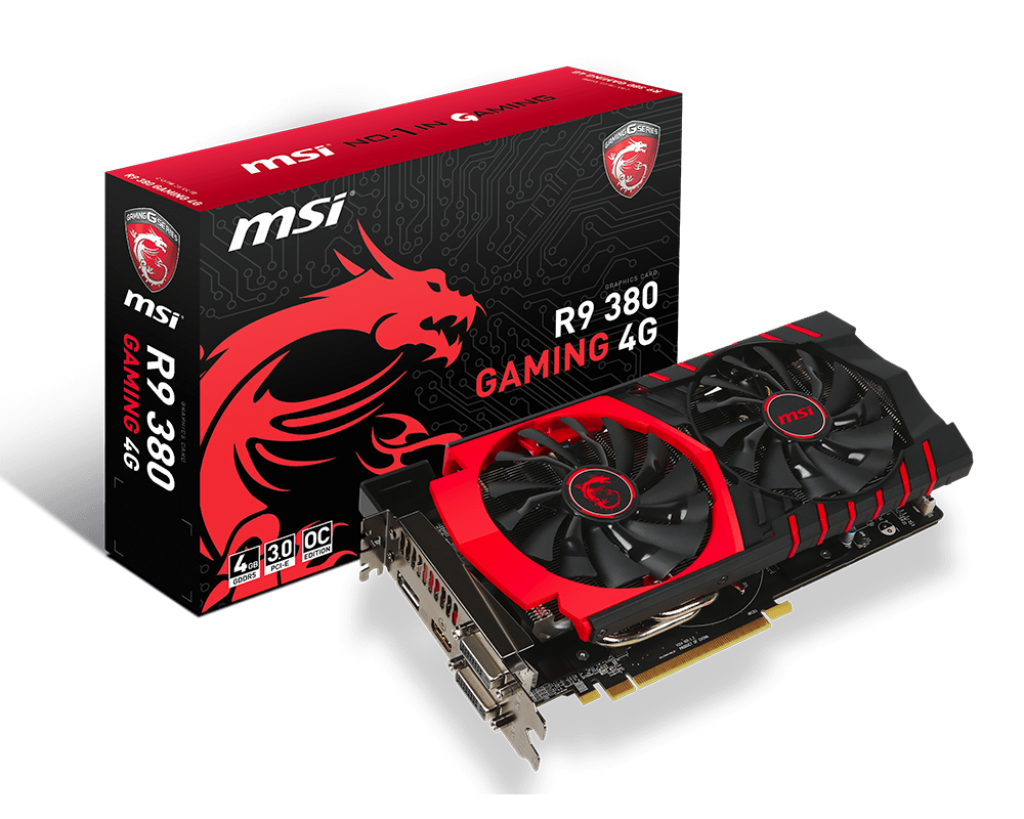
The MSI R9 380 4G comes in the traditional packing that we are used to from MSI, its a sleek box predominated by the signature black and red theme. On the front you'll find the dragon occupying most of the real estate on the left with the MSI emblem followed by the product's name on the right.
Key features like 4GB of memory, PCI-e 3.0 compatibility are enlisted at the bottom left. This entire package is accentuated by glossy embossed circuitry background which I personally love and adore!
At the back you'll find everything that a customer would like to know about his purchase. MSI has made sure that you get accustomed to its new and improved cooler very well covering most of the area with pictures and details about the fan designs, heatpipes etc all of which I'll cover in the next section. Key features of the card are well listed along with briefings about the MSI Gaming App and minimum system requirements.
I'm impressed how well MSI has managed to lay out so many features on the box itself without making it look cluttered!
Inside you'll find the card wrapped in an anti-static wrap resting in a thick foam cavity along with a thin box that contains all the accessories. The package includes the Driver Disk, DVI to VGA adapter, Quick User guide and the card itself. Sadly no MSI badge/decal is provided to show it off on your chassis which disappoints me, but then its all about personal taste and preferences.
Looking at the card itself, MSI has done a fabulous work from designing to execution on this card. The red and black scheme never looked any better and this means that you can match this card with almost any gaming setup of today since most motherboards follow the same color pattern.
The card features the Twin Frozr V cooler and has two 100mm Torx fans that abide the ZeroFrozr technology meaning your fans will not spin at all until a certain temperature mark! You can also see a pair of heatpipes protruding out of the plastic shroud both at the top and bottom adding an edge to this assembly.
The MSI Gaming model card comes with HDMI, DisplayPort and two DVI monitor connectors so all the bases are covered.
At the back a nice metal backplate is included which not only acts as a cooler but also gives the card and aesthetic appeal since you'll see this portion from outside your chassis once the card is installed in the system. The MSI dragon is there to avoid things from getting too bland!
Since this is a budget card a backplate added to the mix increases the card's value by manifolds since the MSI GTX 970 lacks this feature even though its priced much higher!
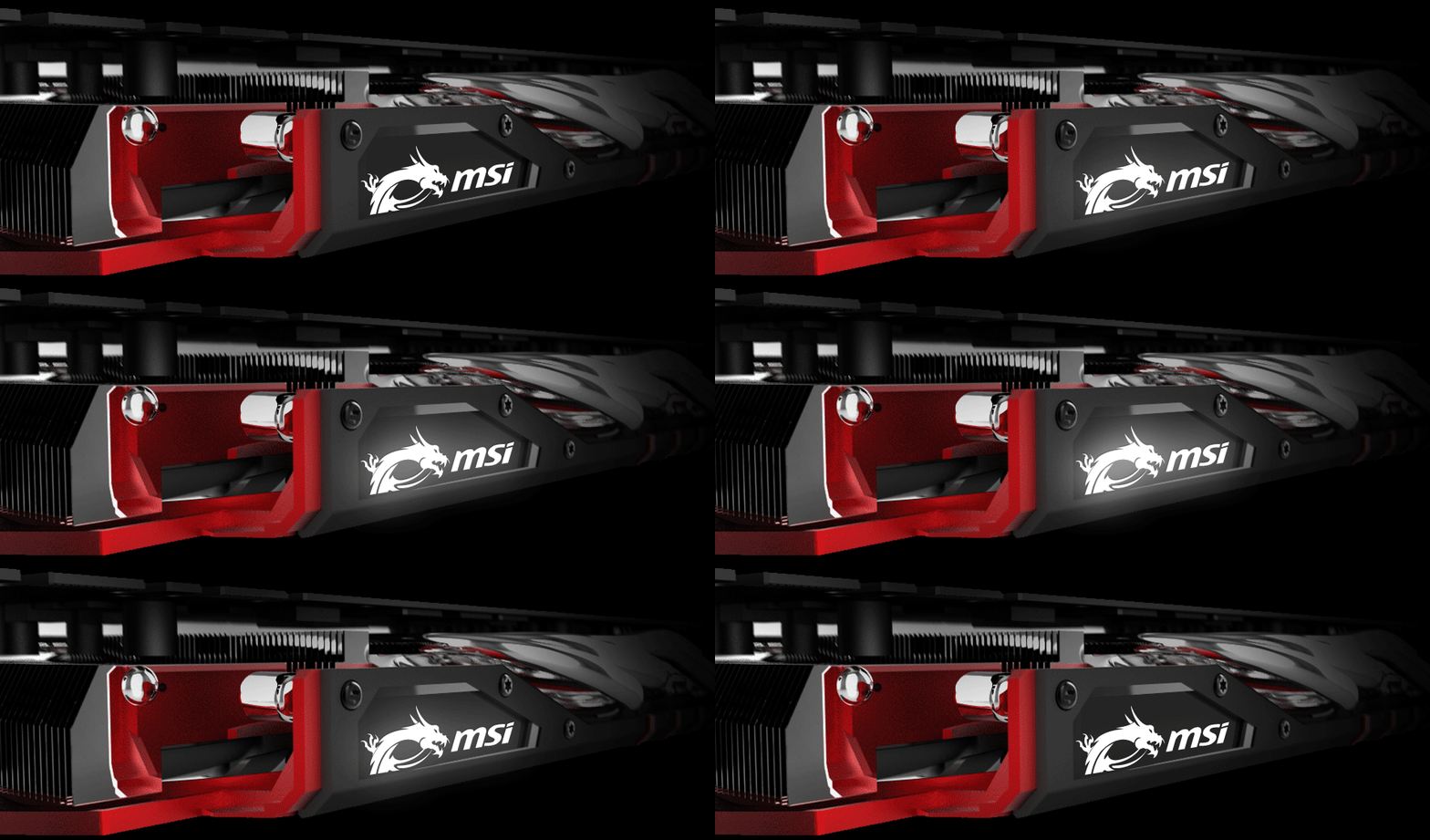
On top we find a LED backlit MSI logo which can be controlled in various fashions via the MSI Gaming App, three heatpipes and two 6-oin PCIe power connectors indicating that this arrangement can draw maximum power upto 225W. No CrossFire ports are provided since the R9 3XX series cards use XDMA technology for CrossFire configurations.
In a nutshell the MSI R9 380 Gaming 4G is an exceptionally well build card that looks just perfect in every sense pleasing system builder and gamers alike.
What's under the hood!
Since mine is a retail sample and I bought the R9 380 Gaming 4G for my personal use I cannot dismantle the card personally to show you what's inside since that'll void the warranty! But don't be disappointed MSI itself provides more than enough data to complete this portion of the review.
From the picture we can see that the MSI R9 380 Gaming 4G is a multi layer card namely as the front shroud, a pair of fans connected directly to the heatsink, a covering layer that is a seperate cooling unit for the VRM and memory chips, the main PCB itself and then the backplate to seal the deal.
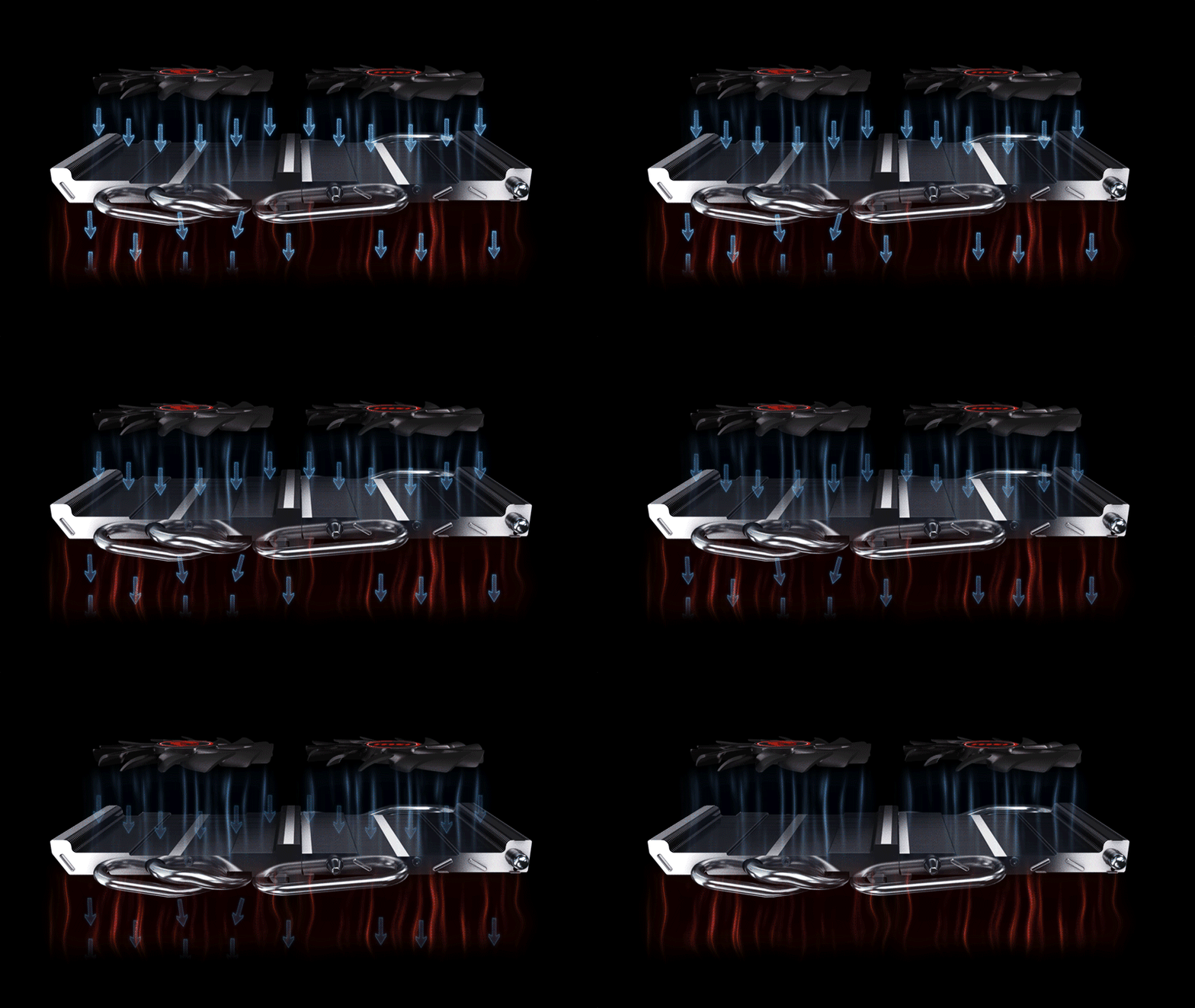
The large 100mm fans on this card are the newly designed Torx fans that are a combination of two types of blades namely as, the traditional fan blade and dispersion fan blade, aligned in an alternate fashion. The traditional or thin fan blades maximize downward airflow and air dispersion to the massive heat sink below them whereas the dispersion blades or the little thicker blades intake more airflow about 19% more than traditional fans to maximizes air dissipation to heat sink without experience much drag force greatly reducing the sound levels while spinning!
This fans have Zero Frozr technology which means that they'll not spin at all until and unless the temperature hits near or over 60°C delivering a perfectly quite experience! Also they are independent of each other so its not necessary that they spin together at the same rate, its all temperature dependent.
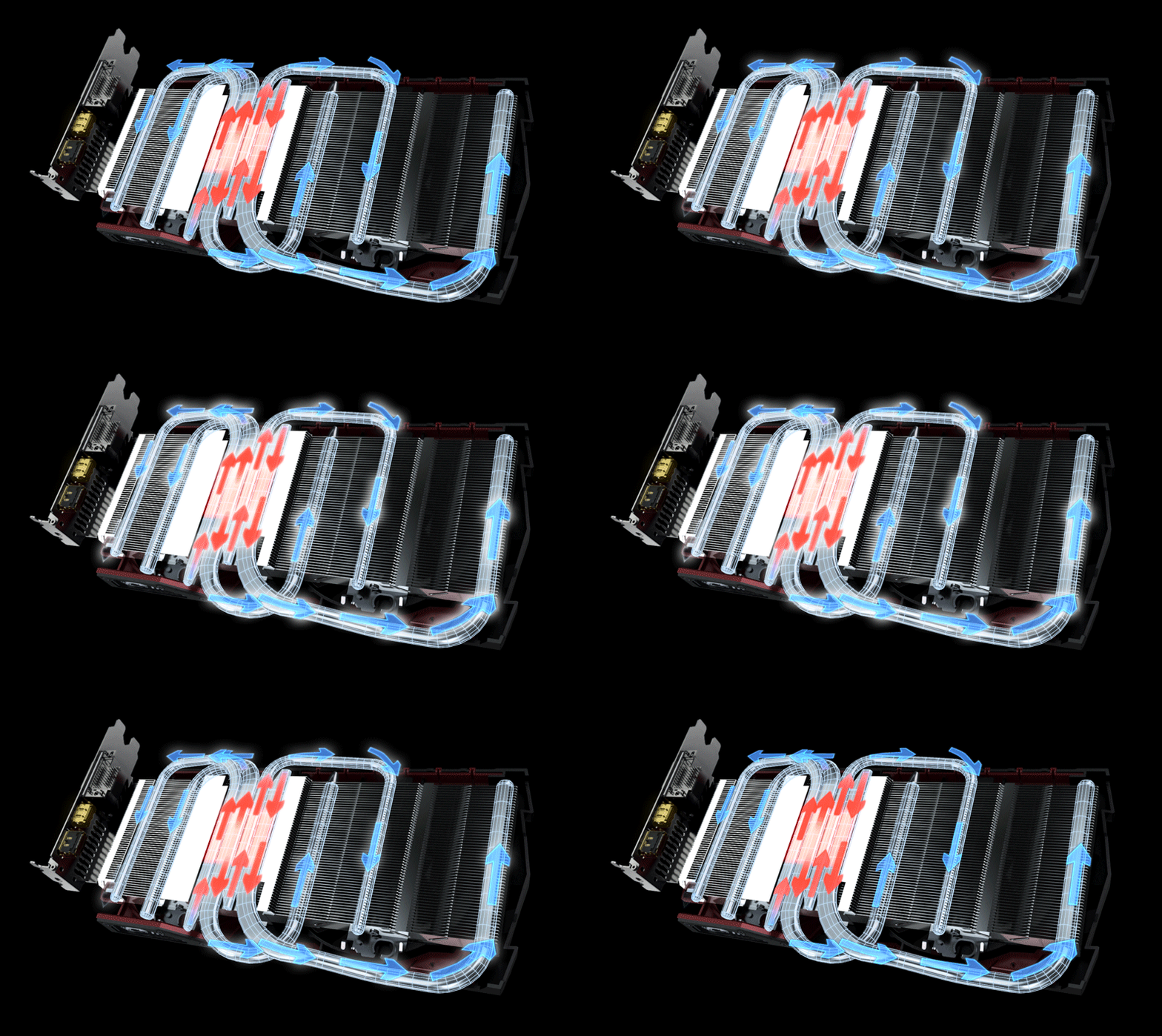
Looking at the heatsink you'll realize that unlike previous coolers this one is quite different with a set of three heatpipes running across the entire area, one is a thick 10mm pipe coupled with two 6mm pipes arranged in the new SuperSU fashion as MSI likes to call it.
This arrangement efficiently puts the massive nickle-plated copper base that cools the Tonga GPU underneath in direct contact with the pipes and also reduces their length significantly for faster heat dissipation.
MSI has fitted Twin Frozr coolers with the all new Airflow Control technology which guides more airflow directly onto the heat pipes by using special deflectors on the heat sink. In addition, this exclusive heat sink design increases heat sink surface area, greatly enhancing the dissipation efficiency.

This is a great cooler since not only its feature rich and skillfully designed but also the GPU is cooled by the heatpipes whereas the VRM and memory uses the separate metal plate to transfer heat making this and ideal card for custom liquid cooling setups and LN2 buckets!
The custom PCB uses a 6+1 phase all digital power delivery system which is a must for high over-clocking potential. Memory chips are from SkHynix each rated at 512MB and eight in total to give you a full 4GB of usable memory. This entire arrangement is complimented by MSI Military Class 4 components to ensure stability in extreme gaming and overclocking sessions. That means HI-C CAPs – 93% efficiency, Super Ferrite Chokes – run at 35°C lower temperature, have 30% higher current capacity, 20% better efficiency and higher overclocking stability, and Solid CAPs – lower ESR and over 10-year lifespan.
MSI Gaming App and Over-Clocking
MSI bundles the R9 380 Gaming 4G with its latest Gaming App installation which has a lot of new features added to it like the MSI Scenamax technology (under the EyeRest tab) to provide you easy access to image quality improving technology along with many more features.
Like the image says the App gives you control over three predefined modes namely as Silent Mode, Gaming Mode and OC mode which vary the clock speeds and fans speeds accordingly.
Silent Mode keeps the card at 970Mhz at a single click ideal for those who want a silent, cool performance from their card putting low to zero load on the GPU.
Gaming Mode is a great addition tweaking the card to 980Mhz ideal for ofcourse gaming and in case you don't have a good airflow in the cabinet to give you the much needed frequency push without increasing the temperatures drastically.
OC mode was my favorite since I got a full 1000Mhz on the clock. Its a great way to get the maximum out of the card without fiddling with the settings for over-clocking. The temperatures are even perfect so no complains on that part aswell.
An interesting feature on the MSI Gaming App is the Cool Down button which looks like a snow flake on the corner, it spins the fans for 40 seconds on 100% speed cooling down the card drastically ideal for hot summers or repeated hit and trial over clocking sessions. I manged to reduce the temperatures from 65°C after full load to 57°C after a single click!
The MSI tribal dragon logo can be controlled via the same suite and can be either turned off, on or in various modes like breathing, flashing, double flashing and random flashing! If this doesn't impress you then nothing will since MSI has got you all covered in case you have a chassis with a transparent side window!
The images explains the various eyerest modes on the app along with its built-in monitoring function for in-game action.
The MSI Gaming App exactly what it should and delivers just right with all the right functions and features that any gamer or user will desire of, condensing everything into one single utility. However the lighting settings will only work as long as the App is running in the background. Once closed or after a system reboot the logo is in a steady glow state with no animation if opted for.
Test Setup and Benchmarks
The MSI R9 380 Gaming 4G comes at 970Mhz right out of the box instead of the 945Mhz that the Tonga chip used to be in the older R9 285 cards. So you can say that the
Antigua GPU is 2.5% faster from the get go itself. All the tests and benchmarks will be conducted at 1000Mhz OC Mode since anyone can reach to that by a single click making that as a standard scale in general.
For overclocking on default voltage I managed a hefty 1100Mhz on the core and 1500Mhz on the memory completing a full run of AIDA64 Enterprise Edition with temperatures very well under the safe mark. You can surely go even further if you like provided you have basic knowledge and fine over clocking skills.
For the test setup we would like to extend our sincerest thank you to Cooler Master, Gigabyte and Corsair for dropping some of the best components right at my doorstep.
The test configuration was as follows:
Monitor: LG E2360V-PN 23" LED LCD 1920x1080
CPU: Intel i7 6700K quad core 4Ghz LGA 1151
Motherboard: Gigabyte Z170X Gaming G1
RAM: G.Skill Ripjaw 16GB (4x4) 3000Mhz DDR4
Graphics Card: MSI R9 380 Gaming 4G 4GB DDR5
Cooler: Corsair H110 280mm
Storage: Corsair Neutron GTX 480GB SSD -- Intel 750 series 400GB NVMe
PSU: Corsair AX860i 860W 80+ Platinum
Case: Cooler Master MasterCase 5
OS: Windows 8.1 Pro 64-Bit
Driver: AMD Catalyst version 15.7.1
AIDA64 5.30 Enterprise Edition GPGPU Benchmark
AIDA64 is a reliable tool to benchmark any component of your system including graphics cards. It is also a stability test tool so you can use it to see how stable your over clock is on the CPU or GPU.
Unigine Heaven 4.0
A compilation of 26 beautiful scenes rendered and run via the raw GPU power of the system. It emulates any game of graphical work that you'll perform on the system scoring it on various parameters. We ran the test on Custom preset and settings at 1920x1080 resolution, quality to ultra and 2xAA.
The compelling score of the MSI R9 380 Gaming 4G proves that its an extremely competent card and all that 4GB of memory is certainly helping it sail smooth in benchmarks.
3D Mark - Fire Strike
Fire Strike by 3D Mark is a test suit that plays a cinematic scene to determine the FPS, GPU temperature and CPU temperature scaling everything via a cumulative score. It is a great tool to benchmark your GPU since the render is GPU dependent.
We can clearly see that the 4GB of memory is benefiting the card greatly in the Ultra test which emulates 4K performance indicating that the card is good enough for 4K movie playbacks if not editing or gaming.
3D Mark 11 Professional Edition
Another variant of the Fire Strike by 3D Mark, used mainly for scoring the GPU performance.
An impressive score is obtained yet again.
Crysis 3
I can't start gaming benchmarks without running my all time favorites Crysis 3 but its a game that no system loves! The CryEngine 3 behind this scenic beauty can bring down any system to its knees and I mean any system. I set everything to Very high at 1920x1080 resolution with MSAA 4X and motion blur high.
Tomb Raider 2013
The reincarnation of Laura Croft in the spectacular Tomb Raider 2013 with stunning graphics and TressFX makes it a great game to benchmark with and also to enjoy in the due course! Settings were at Ultra with TressFX enabled on full HD resolution.
Mad Max
Powered by the Havok engine you find yourself in the shoes of a man struggling for survival on a post apocalyptic earth. A beautiful game that we tested at everything cranked up to maximum on full HD resolution.
Assassin's Creed 4 - Black Flag
A beautiful creation by Ubisoft that can be severely punishing on most of the GPUs since it has a lot of water texture to render and rich distant objects to reproduce on the screen. God rays were enabled at high and details were set at High. Keep in mind that this game is optimized for Nvidia GPUs and not neutral.
Alien Isolation
Its a great game for people, like me, who love to hunt down Xenomorphs or aliens with guns blazing all over the place. The game is highly optimized for PC and supports DirectX 11 with Tessellation, real-time Direct Compute radiosity, and shadows making it an ideal game to benchmark with settings at Ultra.
Batman Arkham Origins
Since the game is powered by Epic's Unreal Engine 3 and supports DX11 tessellation so playing this game on 1920x1080 resolution with all settings maxed out can be any modern system's 'worst nightmare'! Wonder if they were drunk while creating the Arkham Knight *wink*
Battlefield 4
Based on the DICE's Frostbite Engine 3 this game not only taxes a CPU and GPU both by reproducing lush details on the screen but also utilizes the DX11 and DX11.1 features coupled with 64-bit binaries! Settings were at Ultra with antialiasing deferred at 2x MSAA and ambient occlusion enabled.
Need For Speed - Rivals
One of the best racing games out there today with stunning graphics and scenic areas. The game stresses the GPU along with the CPU and even RAM at places when the player drives really fast through traffic. Tests were run at Ultra settings in busy traffic, as a racer in bay area.
Far Cry 4
A bit poorly optimized game for the PC port adds up to its taxing nature on systems! Powered by the latest version of the Dunia 2 engine, Far Cry 4 takes advantage of DirectX 11 and is extremely resource heavy. Optimized for Nvidia GPUs this game can be taxing on AMD cards on higher settings. Settings at High on 1920x1080 resolution with Fur on, godrays at volumetric fog, ambient occlusion disabled.
GTA V
I know you were missing this in the list, don't worry I've got your back. Rock Star Games made the PC port of this game so well optimized that by utilizing the CPU and GPU alike it produces scenes that can put any console to shame, to put it mildly. We tested the game at Very High settings at 2xMSAA, Grass, Reflection and Post FX at Ultra. Anisotropic Filtering was at x16 and reflections MSAA off.
Temperature and Noise Levels
The fans on the MSI R9 380 Gaming 4G courtesy to its Zero Frozr technology don't spin at all in ideal state with temperature readings below 60°C so the fan was at 0 decibel, once spinning we recorded a peak value of 32dB from a distance of 1m with the MasterCase open from one side and all case fan's switched off. Hitting the cool down button will make the card sound like a jet engine at 48dB but that's understandable considering how well it works!
Temperatures were as impressive as they get and didn't go anywhere above 66°C even under full load. The ambient temperature was 22°C and only one 140mm case fan was configured as intake. MSI has sure put up a cooler that has been the best we've seen so far from any manufacturer, so one extra point for that.
My Verdict
Priced at roughly $230 or Rs 22000 in India the MSI R9 380 Gaming 4G is directly competing with the GTX 960 4GB variant both in terms of price and performance. Looking at the stats its clear that they are equal when it comes to 1080p performance but the R9 380 just manages to itch a notch higher in anything above that even in games like GTA V some GTX 960 models choke where the 380 glides out easily. But all this comes at the cost of higher power consumption which is entirely one's personal preference since a 500W PSU can handle both card easily so no drastic difference in configuration is required.

Talking about the card alone, MSI has tweaked the Antigua GPU just enough that you don't feel the need of anything else. The comprehensive MSI Gaming App is one of the best GPU utilities we've seen so far and along with the Twin Frozr cooler that boasts nice little additions like the Torx fans and Zero Frozr technology its a welcome new cooler that justifies its massive design. XSplit Gamecaster is bundles along with a free 6 months premium subscription sweetening the deal even further for those who are into gameplay casting.
I recommend the MSI R9 380 Gaming 4G to every discerning gamer who is on a mid-range budget and wants a card that clocks well, is easy to maintain, looks cool, stays cool and performs like a boss in every modern game title. If you are out there for a new card for your rig then be sure to looks at the MSI R9 380 Gaming 4G on your next shopping spree.
I give it a
9/10